Emergency departments are the highest-volatility area of any hospital. The ER combines 24/7 public access, medical crises, behavioral health episodes, intoxicated patients, family conflicts, and the occasional weapon. If you are an administrator, facility manager, or security buyer for a hospital, you are not just hiring guards — you are contracting a rapid-response system. The emergency room security needs you define today will either protect your staff or leave them exposed during the next code gray.
When contracting hospital emergency room security, require dedicated ER-trained officers, a panic-button escalation workflow, digital incident reports, GPS supervision visibility, and a client portal for serious events. Do not accept generic building security coverage in an emergency department.
What Makes Hospital Emergency Room Security Needs Different?
Emergency room security needs are different because the ER is a public, emotionally charged environment where clinical care and security risk overlap constantly. Unlike a lobby or loading dock, the emergency department sees sudden escalations, involuntary behavioral health holds, victims of violence, and family members who may become combative. A guard cannot simply observe and report; they must actively de-escalate, respond to alarms, and document everything.
ER security requirements are the operational and contractual standards that protect staff, patients, and visitors inside an emergency department. They cover post orders, response protocols, training, supervision, reporting, and escalation. In Texas and across the U.S., healthcare facility licensing and accreditation bodies expect hospitals to maintain a safe environment, but the specific security terms are up to you. That means your contract must be explicit.
What ER Security Requirements Should You Put in the Contract?
Your contract should specify exact ER security requirements, not a generic “guard coverage” line. A strong emergency department security agreement includes measurable duties, response times, and reporting obligations. Use this buyer checklist as a starting point.
| Contract area | What to require | Why it matters for the ER |
|---|---|---|
| Post orders | Written ER-specific post orders, reviewed quarterly | Prevents guards from drifting into “lobby mode” |
| Panic alert workflow | Guard response to staff panic buttons, code gray, and duress alarms | Seconds matter when a patient or visitor turns violent |
| Incident reporting | Digital reports completed before end of shift | Creates a defensible record and trend data |
| Supervision | GPS-verified supervisor tours and spot checks | Confirms guards are actually in the ER, not the parking lot |
| Visitor screening | Access control, metal detection, and visitor logs | Reduces weapons and unauthorized entry |
| Training | De-escalation, use-of-force, behavioral health, HIPAA | ER guards face clinical and psychiatric situations daily |
| Staffing ratios | Minimum coverage during peak hours and patient surges | One guard cannot cover triage, waiting room, and ambulance bay alone |
The table is a contract tool, not just a purchasing guide. Put these items in writing, then verify them with data. If your security provider cannot show proof of rounds, incident reports, or supervisor GPS checks, you are buying promises, not protection.
Hospital Guard Duties in the Emergency Department
Hospital guard duties in the emergency department should go beyond standing at the entrance. In a well-run ER, guards are integrated into the clinical team’s safety workflow. Common duties include:
- Controlling access to triage, treatment areas, and ambulance bay
- Screening visitors and managing the waiting room
- Responding to staff panic alarms and code gray calls
- Observing behavioral health patients who require a sitter or security watch
- Assisting with de-escalation before situations require physical intervention
- Supporting clinical staff during restraints or involuntary holds when trained and authorized
- Escorting staff to vehicles during late-night shift changes
- Documenting every incident, use of force, and security response
A panic button workflow is the agreed sequence from alarm activation to guard response and documentation. It should be rehearsed, not just written. Look for a provider that uses a panic button system for security guards so that staff alarms reach the right guard and are logged automatically. That reduces the chance of a lone nurse pressing a button and waiting without backup.
How to Staff Hospital Emergency Security
To staff hospital emergency security correctly, base coverage on patient volume, peak hours, behavioral health volume, and physical layout — not just square footage. A 12-bed rural ER has different needs than a Level I trauma center in Houston or Dallas. Ask your provider to conduct a site-specific risk assessment before proposing staffing.
At minimum, an emergency department should have:
- 24/7 dedicated ER coverage, not a roving hospital guard
- Overlap during peak hours, usually mid-afternoon through early morning
- A clear backup plan when a guard calls in sick or takes a break
- At least one supervisor available for rapid response and spot checks
- Guards trained in trauma-informed communication and psychiatric emergencies
Your provider should use hospital security guard software that gives you visibility into who is on post, when they arrived, and how they responded. If you cannot see that data in real time, staffing is just a number on an invoice.
Require a Client Portal and Digital Incident Reporting
For serious ER events, you should not have to wait for a paper report or an email. A digital incident report is a real-time electronic record that captures what happened, where, who responded, and what actions were taken. It should include photos, witness statements, and timestamps. This is the difference between a documented security operation and a liability blind spot.
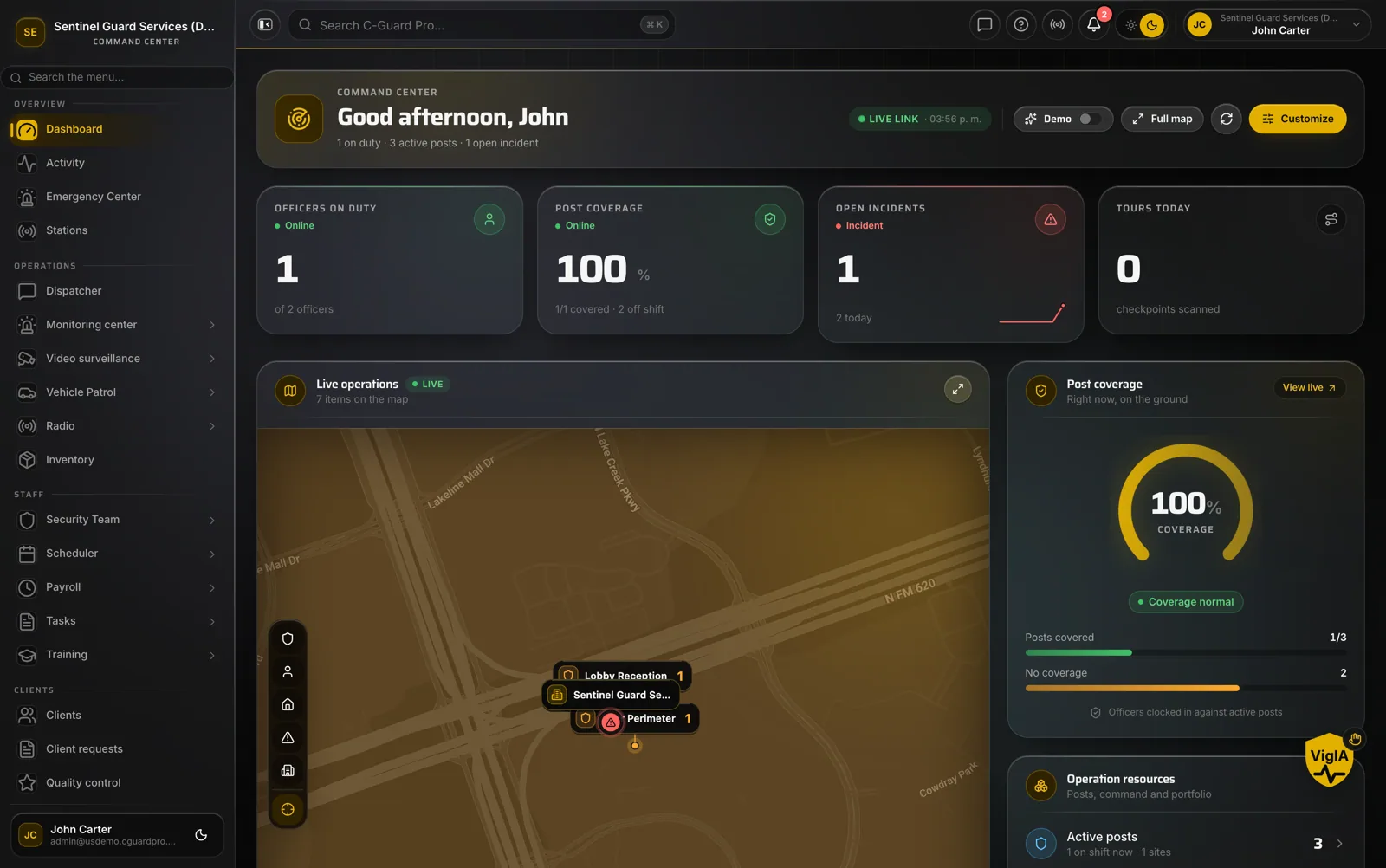
Caption: A client portal dashboard should let hospital administrators see live guard status and serious event reports without waiting for an email.
Your security provider should give you a client portal for security companies that shows incident reports, guard check-ins, and supervisor activity. That portal matters most after a violent event, a patient elopement, or a complaint. You need to review the timeline immediately, not request records days later.
Digital daily activity reports should also capture routine ER activity: visitor counts, security escorts, behavioral health watches, and any disturbance. Over time, this data helps you justify more staffing, adjust shift coverage, and spot recurring risks such as weekend surges or specific patient populations.
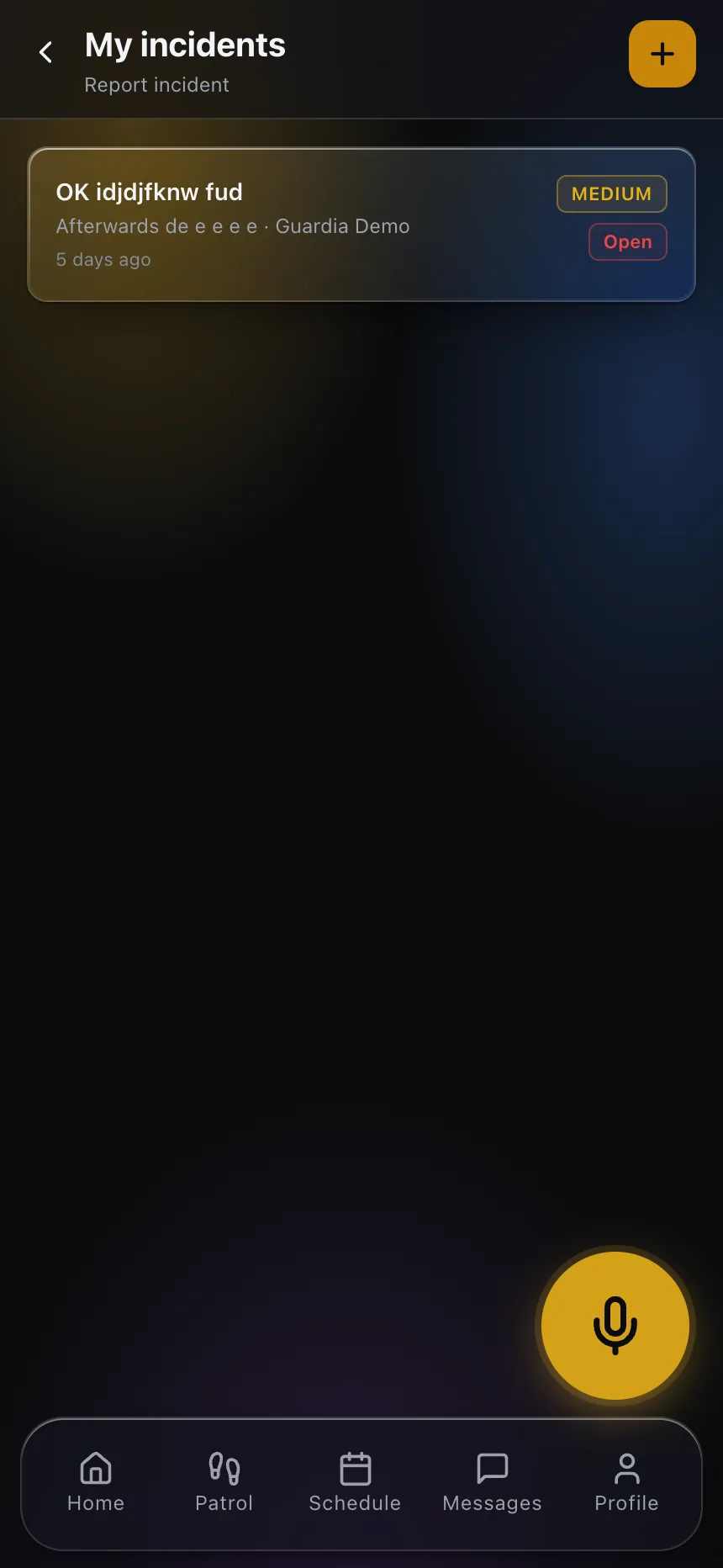
Caption: Guards should complete digital incident reports from their phones, with timestamps and photos attached before the shift ends.
This is not about buying software for its own sake. It is about demanding the same operational transparency from your security provider that you already demand from clinical departments. If your provider uses paper logs and phone calls, you are operating blind.
Healthcare Security Buyer Checklist for Emergency Departments
Use this quick checklist when reviewing any hospital emergency room security proposal:
- Does the contract include ER-specific post orders?
- Are panic button response times defined and tested?
- Are incident reports digital and visible to hospital administrators?
- Does the provider use GPS supervision to verify guard presence?
- Are guards trained in de-escalation, behavioral health, and use-of-force?
- Is there a named supervisor for after-hours emergencies?
- Can the provider scale up for patient surges or security alerts?
- Do you have client portal access to serious event reports?
If the answer to any of these is no, you are not buying emergency department security. You are buying a uniformed presence.
Frequently asked questions
What should ER security guards handle at a hospital?
ER security guards should handle access control, visitor screening, patient watch, de-escalation, response to panic alarms and code gray events, and physical intervention only when trained and clinically authorized. They are not clinical staff and should not make medical decisions. Their role is to protect staff, patients, and visitors while documenting every security action.
How is emergency room security different from general hospital security?
Emergency room security differs because the ER has 24/7 public access, higher emotional volatility, intoxicated or psychiatric patients, families in crisis, and frequent code gray events. General hospital security may focus on lobbies, parking areas, and scheduled rounds. ER security requires faster response, specialized de-escalation training, and closer coordination with clinical staff.
What training should a hospital security provider have?
A hospital security provider should have documented training in de-escalation, use-of-force, behavioral health, restraint and seclusion awareness, HIPAA, emergency codes, and active-shooter response. Many U.S. hospitals also look for IAHSS certification or equivalent healthcare security training. State licensing requirements vary, so ask for proof of current certifications and scenario-based training records.
What reports should hospital administrators receive after incidents?
Hospital administrators should receive a digital incident report that includes time, location, staff involved, actions taken, witnesses, photos or video, and any use-of-force details. They should also receive trend reports showing repeat incidents, peak times, and specific locations. These reports should be available through a client portal, not buried in a paper binder.
Your emergency department cannot run on generic security. Demand ER-specific post orders, panic workflows, digital incident reporting, and real client-portal access. When you hold your provider to that standard, you protect your staff and give your hospital the documentation it needs after every serious event. See what that standard looks like in practice by exploring the CGuardPro client portal.