Hotel security guard software
for hotels and resorts
Hotel security guard software has to work at the pace of a property that never closes: guests arriving at two in the morning, a wedding in the ballroom, a pool that should be empty after hours and a garage full of cars that are not yours. CGuardPro keeps the rounds verified floor by floor, puts every incident on record with photos while the guest is still in the lobby, and lets the hotel's general manager or security director read the service instead of asking for it. Trusted by 600+ security companies worldwide.
Real product screenshots
Short answer
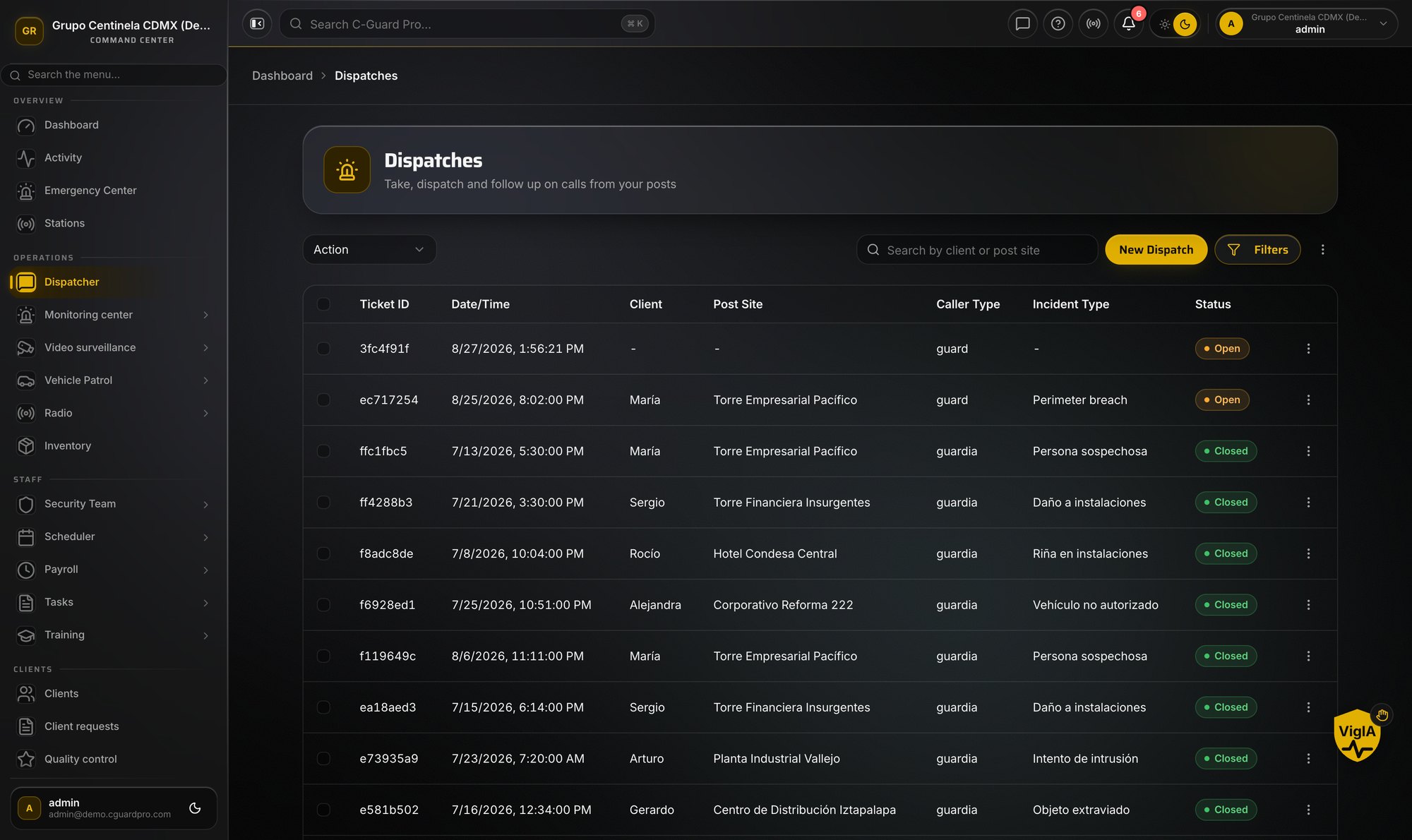
Hotel security guard software has to keep pace with a property that never closes: rounds on every floor and garage level, incidents documented while guests are present, and clear reporting to management. CGuardPro verifies QR or NFC checkpoint scans floor by floor, lets officers file incidents with photos, category and severity, provides push-to-talk channels on officers' phones, logs service-entrance contractors and deliveries, and gives the general manager a portal for their property.
At a glance
- Typical checkpoints
- Each floor, stairwells, pool gate, loading dock, garage levels
- Key records
- Verified rounds, incident reports, service-entrance log, shift pass-down
- Communication
- Push-to-talk channels on officers' own phones
- Alerts
- Missing clock-in and officer panic button
- Client view
- GM or security director portal for their property
Where hotel contracts get uncomfortable
The guest complaint arrives before the report
A noise complaint on the eighth floor, a dispute at the bar, a car scraped in the garage. The guest has already written the review; your officer's account exists only in a conversation at the front desk.
Floors, stairwells and back-of-house nobody can confirm
Long corridors, service stairs, loading dock, pool deck and parking levels. A round that skips the far wing looks exactly like one that walked it, until something happens in the far wing.
Too many people who need to know
Front desk, the duty manager, housekeeping, engineering and your own supervisor all want to hear about an incident, and usually hear three different versions of it.
How a hotel runs on CGuardPro
Checkpoints where the risk actually is
QR codes — or NFC tags if you prefer them — on each floor, the stairwells, the pool gate, the loading dock, the mechanical rooms and each garage level, scanned from the officer's own phone and verified against the route and the hours it applies to.
Incidents filed while the guest is still there
Slips, disturbances, medical calls, lost property, trespass: reported from the phone with photos, category and severity, and visible in dispatch straight away rather than rebuilt at the end of the shift.
One radio channel, no handsets to buy
The team talks over the app's push-to-talk channels, and the important events are still filed as reports instead of only being said out loud.
The hotel reads its own service
The general manager or security director gets a portal limited to their property: rounds completed, activity reports with photos and incidents raised, with the times they really happened.
What the hotel gets
- Verified rounds on every floor, stairwell, pool area and garage level
- Incident reports with photos, category and severity, filed on the spot
- Push-to-talk channels on the officers' phones
- Panic button on every officer's phone, wired into your monitoring center
- A searchable log of contractors, deliveries and vehicles at the service entrance
- A pass-down at shift change, so the night officer knows what happened in the evening
Frequently asked questions
How do we prove the overnight floor rounds were walked? +
Each checkpoint scan carries the time, the phone's position and the identified officer, and is verified when it reaches the system. The round reads as a whole afterwards — which floors were covered, which were skipped and how long it took — and the hotel can see it in its own portal.
A guest says an officer ignored a complaint. How do we answer? +
With the record. If the officer filed the incident, it carries the time, the place, the photos and the officer's name. If nothing was filed, that is visible too, which is a conversation you want to have internally before the guest's version becomes the only one.
Will the app work in the garage and the service corridors? +
Mostly. Scans, reports, photos and visitor entries are stored on the phone and upload when coverage returns: a report keeps the time it happened, while a checkpoint scan is stamped by the server as it arrives. Clock-in and clock-out need a connection at that moment, so agree where on the property the shift is punched.
Can we log contractors and deliveries at the service entrance? +
Yes. Each entry records the person, their company, who authorised them, the vehicle and its plate — the app can read the plate from a photo — and the exit time. The log stays searchable afterwards.
Can different posts in the hotel follow different instructions? +
Yes. Orders are written per post, so the lobby, the service entrance and the garage patrol each carry their own instructions, and a relief officer who has never worked the property opens the same orders on their phone at clock-in.
What happens if the night officer does not show up? +
The missing clock-in raises the alert by itself, so dispatch sees the uncovered post and can reassign from the same screen before the front desk notices the lobby is empty.
Walk one hotel night with us
Book a demo and we build a hotel route together — floors, pool deck, dock and garage — then file one incident and show what the general manager would read the next morning.