Software for armed security companies
where the paperwork carries more weight
An armed post raises the stakes of every record. The officer's firearm permit has to be current on the day of the shift, a use-of-force incident has to be documented completely and quickly, and an officer in trouble has to reach dispatch with one action. CGuardPro keeps those three things on the same platform you use to schedule, clock in and report, so the record exists before anyone asks for it.
Real product screenshots
Short answer
Armed security company software tracks the credentials armed officers need and documents what happens on armed posts. CGuardPro stores guard cards and armed or firearm permits with expiry dates and warns the office 7 to 120 days ahead, repeating weekly until renewed. It warns rather than blocks. Use of force is its own incident type with required fields, and a panic button opens a top-priority case in dispatch with the officer's location.
At a glance
- Licenses and permits
- Guard cards, armed or firearm permits, other certifications, with expiry dates
- Expiry alerts
- 7 to 120 days ahead, repeated weekly; warns, does not block
- Use of force
- Own incident classification with required fields and routing
- Panic button
- Audible alarm in dispatch with identity, post and GPS location
- Price
- $5 per user per month, every feature included
What goes wrong on armed contracts
An expired permit found after the fact
Firearm permits and armed guard registrations expire on their own schedule. When the dates live in a spreadsheet nobody opens, the lapse is discovered by the client, the insurer or the state, not by the office.
A use-of-force report written from memory
The most scrutinized report a guard company files is often written hours later, on a generic form, missing the sequence of events, injuries or whether police responded. Gaps in that report are what get read out later.
Help that depends on a phone call
An officer in a confrontation may not be able to dial, explain and wait. If the alarm does not carry the officer's identity and location on its own, dispatch loses the minutes that matter.
How CGuardPro supports an armed operation
Keep every credential on the officer's record
Record each guard card, armed or firearm permit and certification with number, issue and expiry dates and a photo of the card. Choose how far ahead the office is warned, from 7 to 120 days.
Get warned before the lapse
A daily check alerts the office ahead of each expiry and repeats every week until the credential is renewed. It is a warning, not a block: the decision to keep an officer off an armed post is yours.
Document use of force properly
Use of force is a classification with its own required fields: the sequence of events, what was used, injuries observed, medical response and whether law enforcement responded. It escalates to the supervisor level your policy sets.
One action to call for help
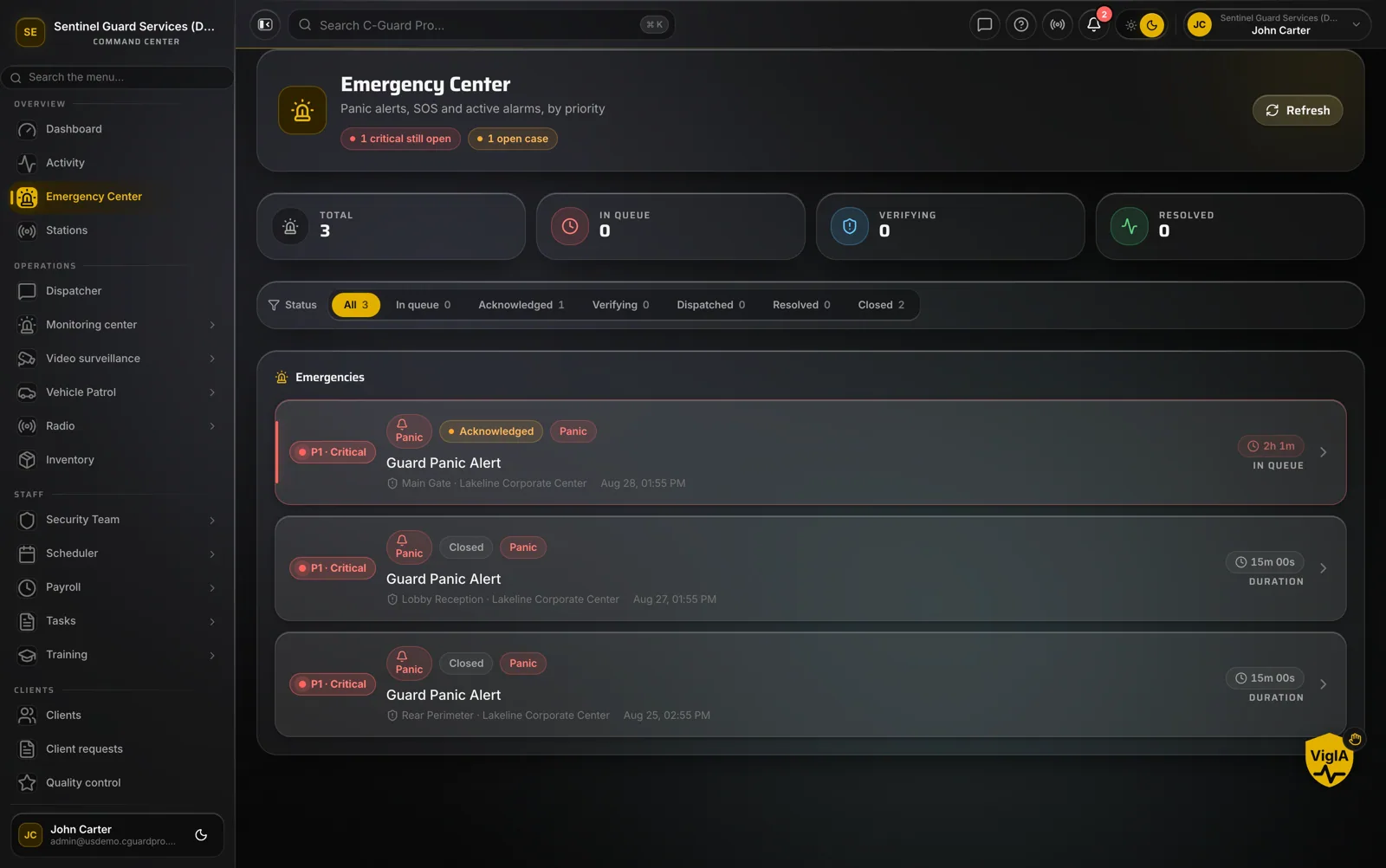
The SOS in the guard app raises an audible alarm in dispatch with the officer's identity, post and GPS location, notifies guards assigned to that site and opens a case that must be acknowledged, dispatched and resolved.
What an armed security company gets
- Guard cards, armed or firearm permits and certifications with expiry warnings
- Use-of-force incident reports with required fields and photos
- Panic button with GPS location and a case that cannot be ignored
- GPS and selfie clock-in with geofences per post
- Post orders attached to each post, readable from the guard app
- Equipment inventory by post and officer for issued gear
- Shift pass-down between officers on the same post
- Editable roles so only the right people see sensitive reports
Frequently asked questions
Can CGuardPro track firearm permits for armed officers? +
Yes. Armed or firearm permits are tracked like any other credential: number, issue and expiry dates and a photo of the card on the officer's record. The office is warned ahead of expiry on a window you choose, from 7 to 120 days, and the warning repeats weekly until the credential is renewed.
Will it stop an officer with an expired permit from working an armed post? +
No. CGuardPro warns; it does not block scheduling or clock-in. It also does not verify licenses with the state. The warnings make sure the office knows in time, and the decision about who stands an armed post stays with you.
How are use-of-force incidents reported? +
Use of force is its own incident classification with required fields, so it cannot be filed as a general observation. It captures the sequence of events, what was used, injuries observed, medical response and whether law enforcement responded, with photos, and it escalates to the supervisor level your policy sets.
Does CGuardPro keep a weapons inventory? +
CGuardPro has a general equipment inventory: items registered with serial number, photo, condition and maintenance date, kept at a post or assigned to an officer. It is not a specialized firearms registry, so check whether your state requires a specific format for weapon records.
Does the software know our state's armed guard rules? +
Armed licensing and training rules are set by each state, and they are your responsibility. CGuardPro keeps the records that show who holds which credential and when it expires. Our state pages summarize what each state publishes.
How much does it cost? +
$5 per user per month, where a user is anyone with a login, with every feature in one plan. There is a one-time $299.99 implementation fee and a 7-day free trial.
See the permit warnings and the use-of-force report
Book a demo. We load a few officers with permits close to expiry, file a use-of-force report and trigger a panic alert so you can see what dispatch sees.