Security dispatch software
for the desk that moves your own officers
Dispatch in a guard company is a labor decision made under time pressure. A call comes in — an alarm response, an uncovered post, a mobile patrol request, an escort — and the desk has to answer three questions at once: who can get there, who is cleared to work that account, and who has not already worked fifty-eight hours this week. CGuardPro turns that decision into a ticket with a clock on it, and leaves behind a record you can bill from.
Real product screenshots
Short answer
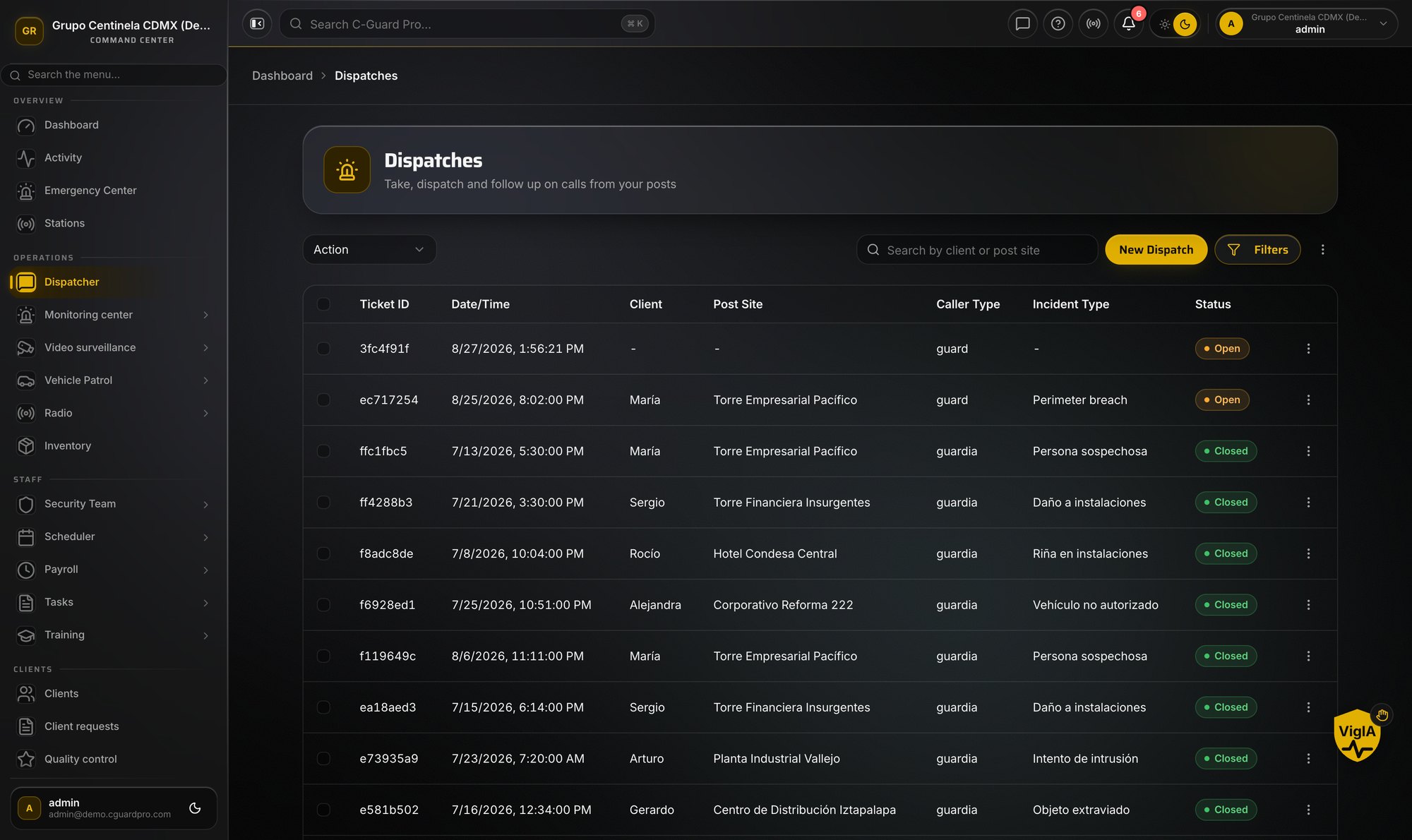
Security dispatch software manages calls that require sending a guard company's own officers, from intake to close. In CGuardPro, every call becomes a ticket with received, dispatched, on-scene and cleared times. The desk assigns from officers who are clocked in, using live positions and hours already worked, and the officer receives the assignment on their phone and closes it with a report and photos. It is not an alarm monitoring central station.
At a glance
- Call types
- Alarm responses, client requests, uncovered posts, escorts, welfare checks
- Times captured
- Received, dispatched, on scene and cleared
- Assignment
- Live positions and hours already worked
- Close
- Report and photos; can open an incident case
- Not
- An alarm monitoring central station
What the desk is actually up against
Three questions, three systems
Proximity is on a map. Licence expiry and site clearance are in a personnel file. Hours worked to date are in payroll, which is a week behind. So the dispatcher assigns the officer whose number they know, and the overtime and the license lapse surface later, at cost.
The call arrives by phone and lives in a notebook
A client calls the after-hours line at 02:40. It gets written on a pad, handled, and mentioned at the morning handover. There is no ticket, no received time, no dispatched time, no on-scene time — and therefore nothing to bill from and nothing to show when the client disputes the response.
Windshield time is the cost nobody counts
A mobile patrol unit crossing town for a nuisance alarm is paid time that produces no billable service. Without recorded travel and on-scene times, route decisions stay a matter of habit and the true cost of covering an outlying account never appears anywhere.
How the dispatch desk runs in CGuardPro
Intake: every call becomes a ticket
Alarm responses, client requests, uncovered posts, escorts and welfare checks are logged with a caller, a client, a post site, a call type and a received time. The ticket exists from the first second, so the timeline is recorded as it happens rather than reconstructed later.
Assign against live positions, not a guess
The board shows who is clocked in and where they actually are, so the desk picks from people who are on duty rather than from a memory of the roster. Credential validity and hours already worked live in the personnel and attendance records — check them there before you commit an officer to a long response, because that is the conflict that shows up later on the payroll run.
Move: the assignment lands on the phone
The assigned officer receives the address, the gate or lobby access details, the call type and the specific instructions for that site, and acknowledges. Status moves from dispatched to en route to on scene, with the times captured from the device rather than typed in.
Close: the report, the client, the billable visit
The officer closes the call with a report and photos. If it turned into something serious it opens a case. The finished ticket carries received, dispatched, on-scene and cleared times, so the response is provable to the client and the visit is ready to bill.
What a ticketed dispatch desk gives an operations manager
- Received, dispatched, on-scene and cleared times captured as they happen, not reconstructed at handover
- Assignment that accounts for hours already worked, so overtime is a decision rather than a surprise
- Licence and site-clearance status visible at the moment of assignment, not at the annual audit
- The nearest available officer identified from live positions instead of from memory
- Travel and on-scene time recorded per call, which is what makes the cost of an outlying account visible
- Every closed call carries a report, so a disputed response has an answer with times attached
- Escalation to the on-call supervisor built into the ticket rather than handled by a private phone call
Guides on this topic
Building a Dispatch Communication Protocol
A dispatch communication protocol that holds up under pressure: roll calls, priority traffic, and keeping the channel usable during a real emergency.
Alarm Response SOP for Contract Guards: The Whole Run, Start to Close
A step-by-step alarm response procedure for security guards: who is dispatched, the approach and exterior check, what gets documented, when police are called and what you tell them, and how the report is closed.
UL-Listed Monitoring vs. Your Own Dispatch Desk
UL listed central station vs contract guard response: a 24/7 dispatch desk isn't the same thing, and claiming it is creates real compliance risk.
Frequently asked questions
Is this an alarm monitoring central station? +
No, and the distinction matters. A central station is a monitoring facility that receives signals from alarm panels over supervised communication paths, and in North America it is typically UL-listed and operates to standards that govern the building, redundancy, staffing and retention. CGuardPro does not do that and does not claim to. What it dispatches is your own officers — the guard-force side of the operation. Many companies run both: the central station receives the signal, and this is the software that decides which officer responds and proves what they did.
Can it work alongside the central station we already use? +
That is the normal arrangement. Calls that reach you from a monitoring provider are opened as tickets on the dispatch board with the source recorded, so the response you are contracted to deliver has its own timeline independent of the signal history the monitoring provider keeps.
How does it know which officer is closest? +
From the live positions of officers who are clocked in and on duty. Our GPS guard tracking page covers how location is captured and what officers see about it. Proximity is one input to the assignment, not the whole of it — the nearest officer is the wrong answer if their license for that account has lapsed.
Does it stop me from dispatching someone into overtime? +
It shows you before you commit, rather than blocking you. Hours already worked in the period appear next to each officer on the assignment view, so sending someone past a threshold becomes a deliberate call with a cost you already know. Scheduling and coverage rules live on our guard scheduling page.
Can we bill for alarm response and ad-hoc calls? +
Yes. A closed ticket carries the client, the site, the call type and the elapsed times, which is what a billable line for a response visit needs. Ad-hoc calls are the revenue most commonly lost in a notebook, because nobody can reconstruct at month end which visits actually happened.
What happens when a call turns into something serious? +
The dispatcher or the officer opens a case from the ticket, and it carries the times and the origin across. From there it follows the incident lifecycle — evidence, supervisor review, client notification and closure — which is described on our incident reporting page.
How do officers receive the assignment in the field? +
On the phone they already carry, as a notification with the address, the access details and the site instructions, with the supervisor acknowledging receipt. Voice traffic still has its place for a fast-moving call, and push-to-talk runs on the same device, but the assignment itself exists in writing so nothing depends on what was heard over a radio.
Does the client see what we dispatched? +
You choose per account. Clients can see the calls raised at their own sites, with times and outcomes, through the client portal. For an account that calls the after-hours line often, that visibility tends to end the argument about response times before it starts.
Put a clock on every call
Book a demo and we will run a call from intake to close: the ticket opened, the officer assigned against hours and credentials, the times captured in the field, and the report attached at close.