Parking security guard software
for garages and parking lots
Parking security guard software earns its keep on the levels nobody likes to walk. CGuardPro puts a verified checkpoint on every deck and stairwell, lets officers log vehicles at the gate by reading the plate from a photo, flags cars that stay longer than the rules allow, and turns a scraped bumper or a break-in into a report with photos — so the property owner reads what happened instead of hearing about it from a driver. Trusted by 600+ security companies worldwide.
Real product screenshots
Short answer
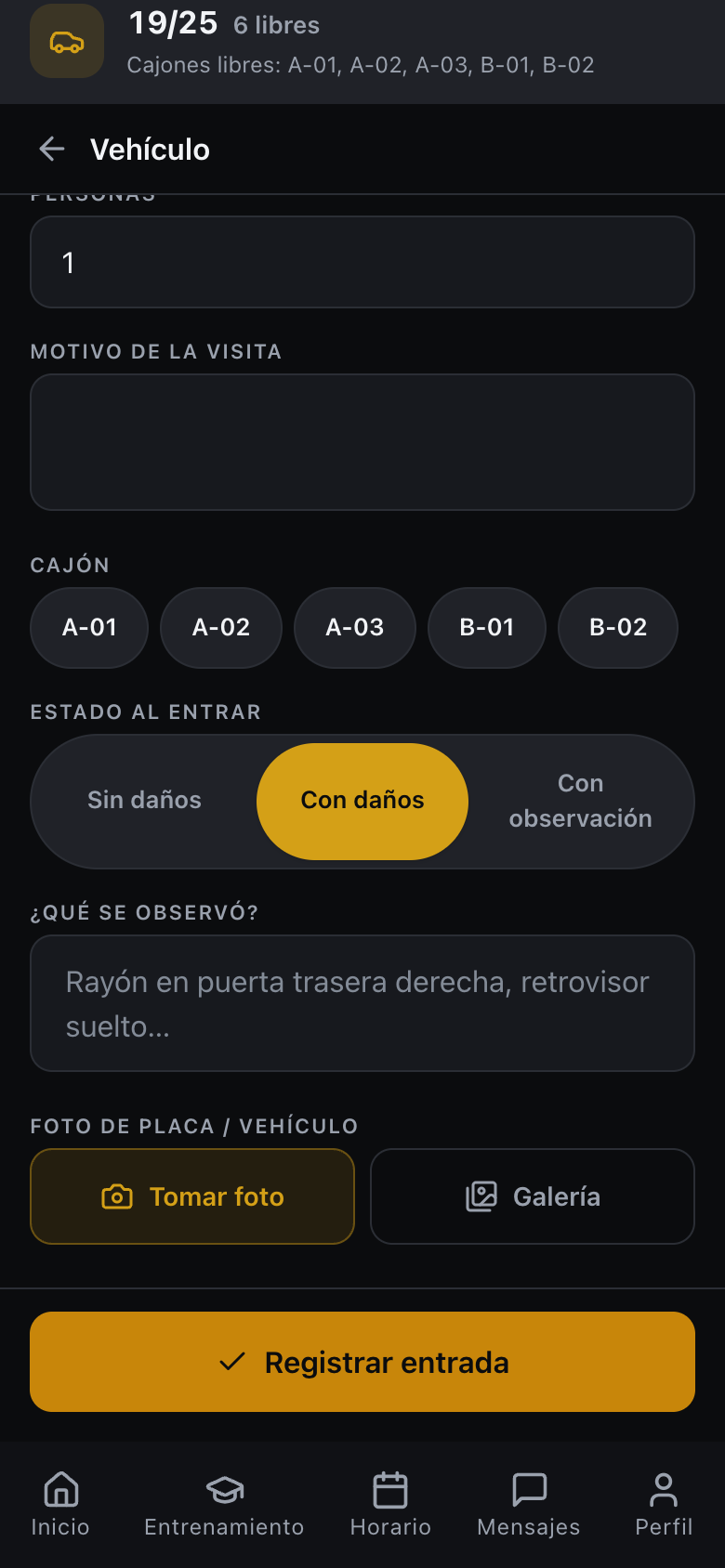
Parking security guard software has to prove patrols on every level and keep a record of the vehicles that enter, stay and get damaged. CGuardPro places QR or NFC checkpoints on each deck and stairwell, reads plates from a photo taken on the officer's phone, records vehicle condition on entry and exit, flags vehicles past a maximum stay once, warns about revoked plates, and lets the property owner read the activity in a portal.
At a glance
- Typical checkpoints
- Each deck, stairwell, elevator lobby and pay station
- Plate capture
- Read from a phone photo; not a fixed LPR camera
- Post settings
- Capacity, numbered bays and maximum stay per post
- Gate hardware
- No barrier control; the officer decides
- Multi-lot patrols
- Vehicle rounds with stops and GPS trail
Where parking contracts go wrong
The top level is where the round quietly ends
The decks furthest from the booth are the ones that get skipped, and they are exactly where break-ins, loitering and abandoned vehicles show up.
Every dent becomes an argument
A driver says the car was fine when they parked it. Without a record of the vehicle's condition, the time and the officer, the owner of the garage is the one who pays for the conversation.
Cars that never leave
A vehicle left for days, a plate the owner asked you to watch for, a lot that is full while the log says it has space. Nobody notices until somebody goes looking.
How a parking operation runs on CGuardPro
A checkpoint on every level
QR codes — or NFC tags — on each deck, stairwell, elevator lobby and pay station, scanned from the officer's own phone and verified against the route and its timing, so a skipped level shows as skipped.
Vehicles logged at the gate
The officer photographs the plate and the app reads it into the entry, with the bay, the vehicle's condition on the way in and the exit against it. A post can hold a capacity figure and numbered bays.
Warnings while the driver is still there
A plate on the client's revoked list, a vehicle already inside with no exit marked, a lot at capacity: the officer is warned at the barrier. The app warns; the person at the gate decides.
Vehicle incidents on the record
Damage, break-ins, collisions and trespass are filed from the phone with photos, category and severity, and reach dispatch straight away.
What the property owner gets
- Verified patrols on every deck, stairwell and surface lot
- Plate read from a photo, with the vehicle image kept either way
- Capacity, numbered bays and dwell-time alerts configured per post
- Revoked-plate warnings that alert the officer without blocking the entry
- Vehicle incident reports with photos, category and severity
- Vehicle patrols between several lots, with their stops and GPS trail
Frequently asked questions
Is this license plate recognition? +
It is plate reading from a photo taken with the officer's phone, not a fixed LPR camera. The officer photographs the plate at the gate or during a patrol, the app reads it into the entry, and the photo of the vehicle is kept either way. There is no barrier control: the platform records and warns, and a person opens the gate.
How do we know a car has been parked too long? +
You set a maximum stay per post. A vehicle past that window is flagged once, rather than repeatedly, so someone actually goes and looks instead of learning to ignore the alert.
Will the app work in an underground garage? +
Mostly. Scans, reports, photos and gate entries are stored on the phone and upload when the officer is back in coverage: a report keeps the time it happened, a checkpoint scan is stamped when it reaches the server. Clock-in and clock-out need a connection at that moment, so agree where the shift is punched.
Can we record the vehicle's condition when it enters? +
Yes. The entry can record the vehicle's condition on the way in and again on the way out, with photos — which is what settles most damage claims before they become disputes.
We patrol several lots with one vehicle. Is that covered? +
Yes. Patrol supervisors run vehicle rounds in their own app: the lots visited, what was checked at each stop and the GPS trail of the whole run, filed as one round.
Can the garage owner see the activity? +
Yes, through a portal limited to their own sites: rounds completed, reports and incidents filed, and the vehicle activity at the gate.
Walk one garage with us
Book a demo and we set up a garage — a checkpoint on each level, the gate with its bays and capacity — then log one vehicle and file one damage report.