Nearly every coverage failure we see starts with the same misunderstanding: treating the shift as something you give to an officer. It isn’t. The shift belongs to the post; whoever is assigned inherits what the post already decided. Build a 24-hour rotating shift schedule around people instead of the post and sooner or later you’ll have two officers on days and nobody on nights — and you’ll find out when the client calls, not before.
This walkthrough covers the three ways to staff a post — 24-hour rotating, 12-hour day or night, and custom — in the order the decisions actually have to be made.
Post first, then pattern, then person
Three separate decisions, and it pays not to blur them:
- The post’s coverage. Which hours have to be manned? Twelve by day, twelve by night, all twenty-four, or a window of your own.
- The rotation pattern. How many days on and off for whoever stands there. It belongs to the post, not the person: set it once and it flows down to everyone.
- The assignment. Which officer, and from what start date. That date is not paperwork — it decides where in the cycle they begin.
When you create a post you pick one of four coverage types: 12h Day (07:00–19:00), 12h Night (19:00–07:00), 24 Hours, or Custom. That choice determines how many fixed slots the post is born with and which patterns you’ll be offered next.
 Coverage is defined once per post, and everything else hangs off it.
The 24-hour rotating shift schedule
Choose 24 Hours and the post is created with two fixed slots. Now comes the question most people skip, and it separates two very different operations.
True rotation
The pattern includes nights. The classic is 4-4-2: four day shifts, four night shifts, two rest days — a ten-day cycle. Both slots share the same window (07:00–19:00) and it’s the rotation that carries one officer into nights while the other works days. Over a month, the same person passes through both halves of the clock.
Use it when you want night load spread evenly across the team, and when night differential should land on everyone rather than one person.
Fixed shifts: one always days, one always nights
The pattern has no night phase. Each slot stays in its lane with mirrored hours: 07:00–19:00 and 19:00–07:00. Nobody rotates; the only thing the pattern decides is how often they get a day off.
Use it when people ask for predictability, when the night post is paid differently, or when the client insists the night officer is always the same person because they know the building in the dark.
The mistake that empties your nights is mixing the two: flagging the post as 24 hours while choosing a pattern with no night phase and leaving both slots on 07:00–19:00. Days get double-staffed, nights go bare, and every screen still labels the post “24 hours”. That’s why the system asks outright whether this is rotation or fixed shifts instead of leaving you to guess.
The start date sets the phase
This is the least understood detail and the one that wrecks the most coverage. Where an officer lands in the cycle is calculated from their start date. Assign both fixed slots with the same date and both will work the same days and rest the same days: the post ends up double-staffed some days and abandoned on others.
To stagger them, the start dates have to differ. On a 4-4-2, separating them by the length of the day block puts one officer on days while the other is on nights. There is nothing to configure on the post itself — the phase is the date.
12-hour day or night coverage
The simplest case. Pick 12h Day or 12h Night, the post is created with one fixed slot, and its hours are locked to 07:00–19:00 or 19:00–07:00.
The pattern here carries no nights: it only says how many consecutive days are worked and how many are off. The system suggests 8-2 (eight on, two off, ten-day cycle), and 5-2, 6-1 or anything you build yourself are available.
The real question on a 12-hour post isn’t the pattern — it’s who covers the rest days. A post the client contracted to be manned every day still needs somebody on the days its regular officer is off. That’s where the relief officer comes in: someone with no fixed post who chains together the rest days of several posts. If every post runs a cycle of the same length, rest days fall staggered and one person can chain them; if each post runs a different cycle, the rest days overlap and you need more people to cover the same ground.
Patterns like Pitman and DuPont solve the same problem with a different arithmetic — worth reading up on if you’re choosing from scratch (see our note on the DuPont schedule).
Custom shifts
For everything the moulds above don’t fit: a warehouse from 06:00 to 22:00, a gatehouse that opens at noon, an event that runs past midnight. You define the window with whatever hours you need, and it’s allowed to cross 00:00.
Two decisions belong only to custom:
Shift length per officer. You can split the window into blocks of 4, 6, 8, 12 or 24 hours, and each block becomes a slot with its own hours. The condition is arithmetic: the block must divide the window exactly. A 16-hour window splits into two 8s or four 4s, but not into 6s. That’s why some options are greyed out — they aren’t broken, they just don’t divide.
Rest-day coverage. Two roads:
- Relief officer covers rest days — the usual mode. One fixed officer per block plus a reliever who steps in on their days off.
- Alternating fixed officers — no reliever. Several officers share the same block, phased so that exactly one is working every day. This is the classic 24-on/24-off: two officers, a 1-1 pattern, one starts today and the other tomorrow.
Alternation requires the cycle to be an exact multiple of the working days: 1-1, 2-2 and 3-3 work; a 4-4-2 means nothing here, and the system refuses it rather than generating an impossible calendar.
Reading the pattern numbers
They’re worth reading carefully, because they change meaning with the coverage type:
- On a 24-hour post,
4-4-2is four days · four nights · two off. Cycle: ten days. - On a 12-hour post,
8-2is eight on · two off. Cycle: ten days. There’s no night field, because the night comes from the post’s window, not the pattern.
Zero rest days is a valid pattern. Some posts are covered every single day by the same person — a small lobby, a client who insists on one familiar face — and the system stores it as written. Whether the law allows it is another matter: maximum hours and mandatory rest vary by jurisdiction and contract type. Check with your labour authority and your advisor; this is not legal advice.
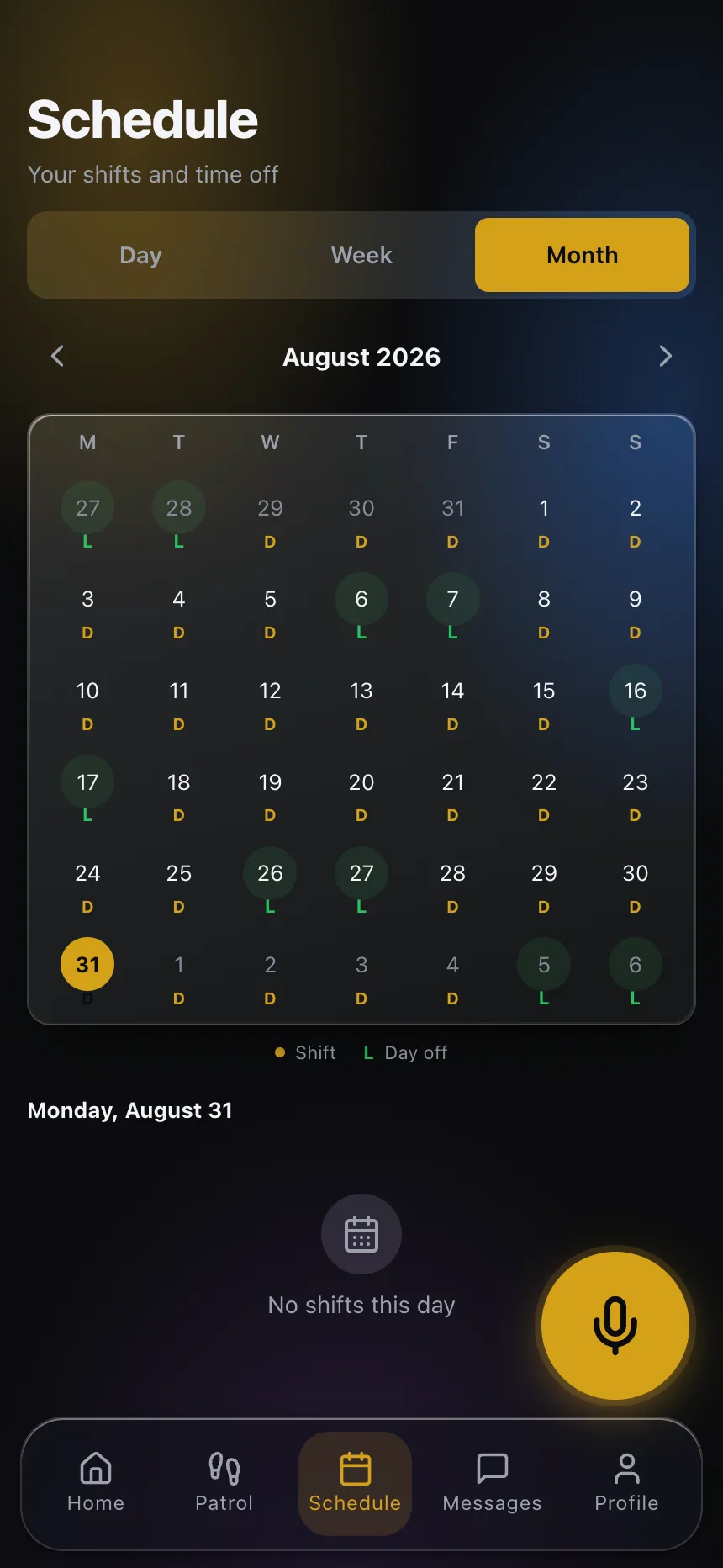 The officer sees exactly the calendar the office generated — nobody has to forward anything.
What happens after you save
On assignment the system generates shifts forward — up to a year — so nothing has to be rebuilt weekly. From there:
- The post’s calendar is visible by day, week and month in guard scheduling.
- Each officer sees their own shifts in the app, with the hours and post assigned to them.
- Clock-in and clock-out are compared against the scheduled shift, so late arrivals and early departures surface on their own without anybody reporting them.
- If somebody doesn’t show, the gap appears as uncovered instead of surfacing through a client complaint.
Changing the pattern later doesn’t erase the past: shifts that already happened are kept because they’re the record that payroll and SLAs rest on, and manually pinned shifts — a transfer, a logged absence, a replacement sent to cover — are kept too, because those are operator decisions, not rotation output.
An order of operations that avoids most of the trouble
- Set the post’s coverage from what the contract requires, not from the people you happen to have today.
- On a 24-hour post, decide up front whether it’s rotation or fixed shifts.
- Use the same cycle length across posts so one reliever can chain the rest days.
- Use different start dates when a post carries two fixed officers.
- Look at the generated calendar before you close the screen. A gap is obvious on a grid; a 3 a.m. phone call is not.
If you want to see how this looks on your own posts, explore CGuardPro or get in touch and we’ll walk through them with you.